Tap a part, tap a colour: the Colouring Book that never runs out of crayons
Paint Studio, with its brushes and blank pages, is wonderful for children who love to draw freely. But many children, especially younger ones, feel stuck in front of a blank page. "What should I draw?" is a real question. For them, a colouring book is the perfect starting point: the outline is there, and the fun is in choosing colours.
The Colouring Book in Create brings that to the screen, without the broken crayons.
How it works
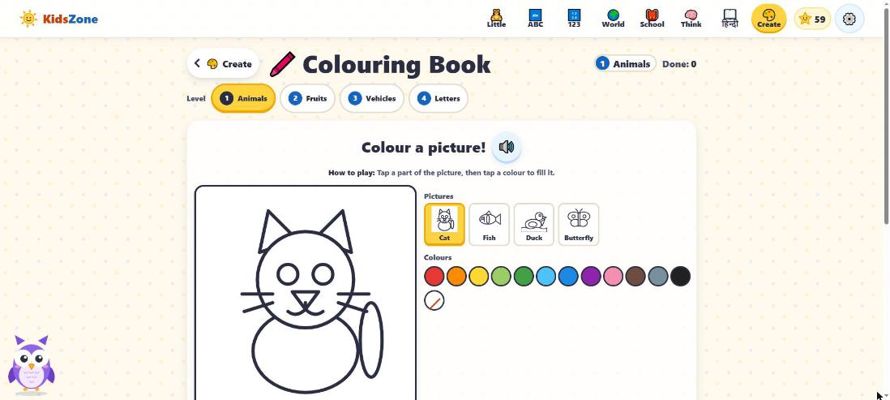
In the screenshot, a large outline of a cat fills the left side. On the right are picture choices, Cat, Fish, Duck and Butterfly, and below them a row of colours: red, orange, yellow, light green, dark green, light blue, blue, purple, pink, brown, grey and black, plus an eraser. The instruction says: "Tap a part of the picture, then tap a colour to fill it."
No colouring outside the lines, no smudges, no mess. A small child can get a satisfying, finished picture in a couple of minutes.
Four sets of pictures
- Animals
- Fruits
- Vehicles
- Letters
The Letters set is a nice touch. Colouring a big A or B is a gentle way to spend more time with letter shapes, which supports early reading.
Saved to My Gallery
When your child finishes a picture they're proud of, it can be saved to My Gallery on the grown-ups page, alongside pictures from Paint Studio. There, you can print it, save it as an image file or delete it. It all stays on your device; nothing is uploaded or shared.
Colour choices are conversations
Watch which colours your child chooses. A purple cat or a green duck isn't a mistake. It's imagination. You can still ask fun questions: "What colour are real ducks? Would a purple duck be able to hide?" But let the picture be theirs.
Colouring and calm
Colouring is a calming activity for many children. It's focused, repetitive and creative at the same time. It's a good choice for winding down before dinner or bed, especially with Calm mode switched on in Settings, which reduces movement and celebration effects.
Print it and colour again
Print a picture from My Gallery as a reference, then ask your child to draw and colour the same picture on paper with real crayons. Moving between the screen and the page builds fine motor skills that screens alone can't.
A family gallery
Choose one picture a week to print and stick on the fridge or a wall. Date it. After a few months, you'll have a little timeline of your child's growing confidence.
If your child is ready for a blank page, Paint Studio is the next step.
Open the Colouring Book on KidsZone.

MindStick Software Pvt. Ltd. is a Microsoft Gold Partner in software application development. Our expertise is in software product design, custom programming, database design, web design and programming and cutting edge mobile applications development.