Numbers 1 to 100: hearing them, seeing them, and spelling them out
Counting to a hundred is a rite of passage. But knowing the sequence by heart and knowing what each number looks like and is called are two different things. Plenty of children who can recite to 100 hesitate when you point to 73 on a page.
The Numbers 1 to 100 page on KidsZone is a simple, calm place to fix that.
What's on the page
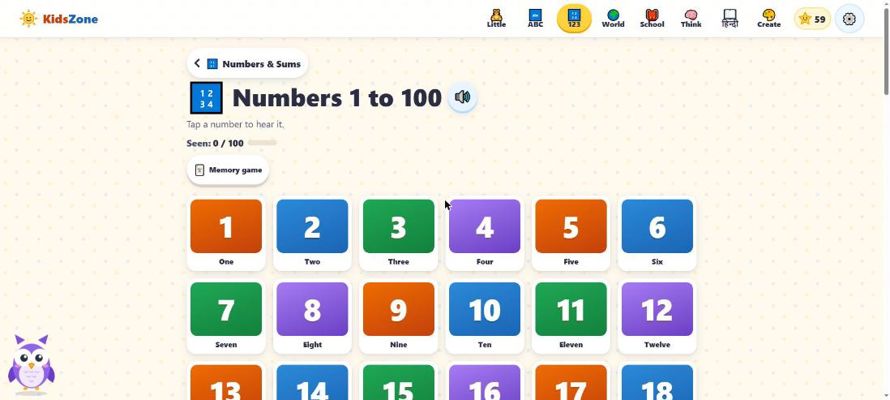
Each number from 1 to 100 has its own coloured card with the numeral in big white digits and the word underneath: 1 One, 2 Two, 3 Three. The colours cycle through orange, blue, green and purple, which makes the grid pleasant to scroll through rather than a wall of digits.
Tap any number and it's read aloud. The Seen counter at the top tracks how many of the 100 your child has heard. There's also a Memory game button that opens a numbers version of the memory card game.
Why the words matter
Number words are surprisingly hard to spell and read. "Eight" has a silent gh. "Twelve" and "eleven" don't follow any pattern. "Forty" loses the u that "four" has. Seeing the word under the digit every time builds familiarity without a spelling test.
The teen trap
Numbers 11 to 19 confuse many children because English says them backwards. We write 1 then 7 for seventeen, but say "seven" first. Spend a little time here. Tap 16 and 61, and ask your child what's different. That conversation is the start of understanding place value.
Five ways to use the page
- Number of the day: pick one, find it, hear it, then spot it around the house (on the clock, a calendar, a lift button).
- Jump by tens: tap 10, 20, 30... up to 100 and listen to the pattern.
- Birthday numbers: find everyone's age in the family.
- Odd one out: tap 21, 22, 23, then ask what comes after 29.
- Bigger or smaller: tap two numbers and ask which is bigger. Then try the proper game, Bigger or Smaller.
For children learning in Hindi too
In Settings you can show game words in English, Hindi or both, and choose the language used for speaking. That helps children who count in Hindi at home and English at school.
Where to go next
After this page, Before, After, Between tests whether your child knows where each number sits, and the Number Chart in School Skills puts all hundred in a grid with gaps to fill.
Explore Numbers 1 to 100 on KidsZone.

MindStick Software Pvt. Ltd. is a Microsoft Gold Partner in software application development. Our expertise is in software product design, custom programming, database design, web design and programming and cutting edge mobile applications development.