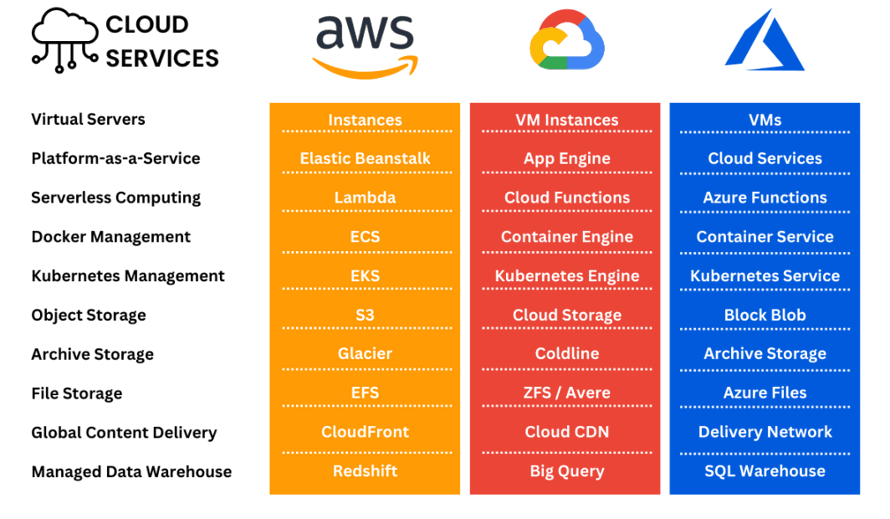
AWS vs Azure vs Google Cloud: What’s the Difference?
AWS, Microsoft Azure, and Google Cloud all provide the building blocks for running applications without owning your own data center: virtual machines, storage, databases, networking, and tools for analytics and AI. The basic capabilities overlap. The differences show up in their service ecosystems, existing software relationships, and the skills or operating habits they fit best.
| Platform | Often a good fit when… | What to weigh |
|---|---|---|
| AWS | You want a wide range of cloud services and deployment options, or your team already has AWS experience. | Its breadth is useful, but choosing and managing services can take time. AWS service breadth is a strength only if it matches what you need. |
| Microsoft Azure | Your organization relies on Microsoft products, such as Windows Server, Microsoft 365, or Active Directory, or needs to connect cloud and on-premises systems. | Microsoft enterprise integration can make adoption easier for some teams, but the fit depends on your architecture and licensing. |
| Google Cloud | Your work makes heavy use of data analytics, machine learning, or Kubernetes, or you value Google’s cloud networking and platform tools. | Google Cloud data analytics is a notable draw for many teams, though the right choice still depends on your required services, support, and existing skills. |
What is actually different?
Service names and designs: The providers offer similar categories, but the products are not interchangeable feature for feature. For example, their virtual machines, managed databases, identity tools, and serverless platforms differ in configuration, integrations, limits, and pricing. Moving an application between providers can require more than changing a few settings.
How they fit into an organization: Azure may feel familiar in a Microsoft-heavy environment; AWS is a common choice for teams seeking a broad catalog and a large ecosystem; Google Cloud is often considered for analytics and container-based workloads. These are useful starting points, not rules—each platform can run a wide variety of systems.
Hybrid and multi-cloud needs: If some systems must remain in a company data center, compare the providers’ hybrid cloud deployments and management tools against your actual requirements. Running across multiple clouds can offer flexibility, but it also adds work around identity, monitoring, networking, security, and staff training.
Price and regions: Don’t pick based on a headline price or the number of global infrastructure regions alone. Estimate the services your application will use, including storage, data transfer, support, and any licensing. Cloud pricing models can be difficult to compare without a workload estimate, and availability varies by service and region.
For many projects, the most practical choice is the platform your team can operate securely and confidently, in a region that meets your needs, at a cost you have modeled. If the decision is close, test the same small workload on each provider and compare performance, day-to-day management, and the bill. Also check whether the managed Kubernetes services or other specific products you rely on behave the way your application expects.

MindStick Software Pvt. Ltd. is a Microsoft Gold Partner in software application development. Our expertise is in software product design, custom programming, database design, web design and programming and cutting edge mobile applications development.